Input routing
Parolsh never guesses whether a line is English or a shell command. The first character decides, always:
| Input | Route |
|---|---|
text | The active ACP agent |
?text | The active ACP agent |
/command | The active ACP agent, unchanged |
!command | The configured shell, default bash -ic |
!+command | The same, and its output goes with your next message |
!bash | An interactive Bash session |
#command | Parolsh itself |
! alone | Lock: plain text goes to the shell, see Shell mode |
? alone | Unlock: plain text goes to the agent again |
find files modified today is always a question for the agent. To run the
Unix find, type !find . -mtime -1.
Shell mode
When you run many commands in a row, ! alone locks plain text to the
shell, and ? alone unlocks it. The prompt's last symbol shows where plain
text goes:
[claude] ~/projects/wallet ✦ !
[claude] ~/projects/wallet ❯ git status             ← bash
[claude] ~/projects/wallet ❯ ?why is main behind?   ← the agent
[claude] ~/projects/wallet ❯ ?
[claude] ~/projects/wallet ✦ what changed today?    ← the agent
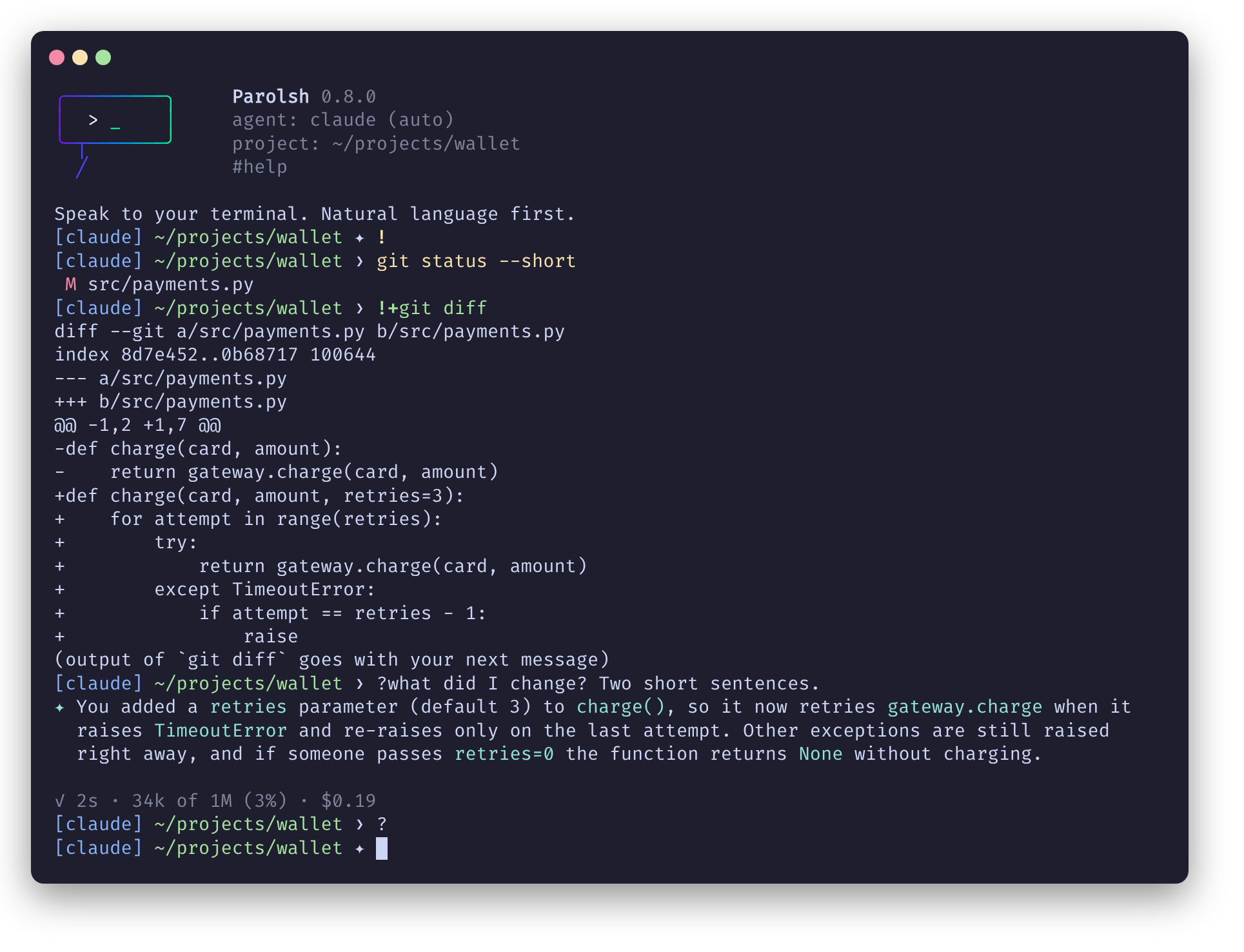
A real session, locked to bash, sharing a diff with the agent, then unlocked:
| Input | Agent mode ✦ (default) | Shell mode ❯ |
|---|---|---|
text | the agent | the shell, like !text |
?text | the agent | the agent |
/command | the agent | the shell (/usr/bin/ls runs); ?/command reaches the agent |
!command, !+command, !bash | the shell | the same |
#command | Parolsh | Parolsh |
Unlike !bash, shell mode stays in Parolsh: the agent is a ? away, !+
shares output with it, and # commands work. Each command runs in its own
shell, but a cd and the variables you export carry over to the next (see
!command). The mode lasts until you change it or leave Parolsh.
To start in shell mode, set input = "shell" in config.toml (see
Configuration), or run parolsh --input=shell;
--input wins over the file. A project's .parolsh/config.toml can set it
too: #cd into a project whose input differs switches to it. Without an
agent configured, Parolsh always starts in shell mode.
While you type
On an ANSI terminal the line shows where it will go before you press Enter:
| Line | Color |
|---|---|
!command, !bash | yellow |
!+command | green |
#command | magenta |
/command | blue |
| text for the agent | the terminal's color |
In shell mode, plain text is a shell command, so it is yellow too. The marker
(!, !+, #, /) is bold. While the line is only a marker, a
dim hint says what it does, for example !+ run a shell command and send its output with your next message. The hint is a tip: the right arrow does not
insert it into the line.
Tab completion
On !command and !+command lines, and plain lines in shell mode, Tab
completes the word at the cursor,
as bash does: a single match goes into the line, several fill in what they
have in common, and the next Tab shows them in a menu (Tab and
Shift+Tab move through it, Enter picks one).
- The command name completes from the programs on your
PATHand, when the shell is bash, from the aliases, functions and builtins your~/.bashrcsets up. That list is read once, in the background, when Parolsh starts: an alias added later shows up the next time. - A command's arguments complete as bash would, when the shell is bash
and bash-completion is
installed: git branches and subcommands, ssh hosts, systemctl units,
--flags. It uses the completions bash-completion ships, those in~/.local/share/bash-completion/completions/and~/.bash_completion, but not the ones your~/.bashrcdefines (complete -C ...,source <(kubectl completion bash)): put those in~/.bash_completionto get them.!bashhas your full bash completion. - Other words, and arguments bash-completion has nothing for (or takes
more than half a second to find), complete as file and directory names,
from the directory your commands run in.
~/and absolute paths work, hidden files show up when the name starts with., and special characters are escaped (My\ Files).
On # lines, Tab completes the command's name (#a gives #agent and
#audit), and after #cd a directory, from the directory your commands run
in. #cd takes the path as typed, so names with spaces are not escaped there
(#cd My Projects/). Other # commands have no arguments to complete.
In text for the agent (?text in shell mode), Tab completes @path with a
file or directory name from the agent's directory, escaped like on a shell
line (@My\ Notes.md); see Mentioning files. Other
words of the text have no completion.
!command
The command runs as bash -ic "<command>", in the directory the last
command ended in.
-
Your
~/.bashrcis loaded, so aliases, functions and shell options work as in your normal terminal. The shell is interactive (-i) because a plainbash -cignores aliases, and the stock Debian/Ubuntu~/.bashrcstops right away when the shell is not interactive. -
A
cdcarries over. When a command ends, its shell tells Parolsh the directory it ended in, and the next command runs there:cd src,cd -,pushd, acdbeforeexit 1. -
So do the variables you export.
export FOO=1,unset FOO,source .envrc,nvm use 20,source venv/bin/activate: what a command changed in its exported variables is applied again before the next one, after your startup files, so it wins over them as in a terminal (the virtualenv stays first inPATH). For each variable the last value replaces the one before.[claude] ~/projects/wallet ❯ source venv/bin/activate[claude] ~/projects/wallet ❯ which python/home/joao/projects/wallet/venv/bin/pythonOnly exported variables: a plain
FOO=1, an alias or a function defined in a line is gone when it ends (so a virtualenv'sdeactivateis not there;set -a; source .env; set +aexports a file of plainKEY=valuelines).!bashstarts with these changes, and is a session that keeps all of its state. They are kept in memory until you leave Parolsh, and are not given to the agent: it keeps the environment it started with. -
The agent stays where it is. A
cdmoves your commands, not the conversation: the agent keeps working in the directory it started in, and the prompt shows both while they differ:[claude] ~/projects/wallet ✦ !cd /var/log[claude ~/projects/wallet] /var/log ✦ #cd . ← brings the agent here[claude] /var/log ✦#cd .starts a new conversation in the directory of your commands. The outputs you share with!+say where they ran. -
The directory comes back through the shell's
EXITtrap, so theshellmust understandtrap(bash, zsh, dash do). A command that ends withexec, or is killed, leaves the directory as it was. -
Commands stay out of your bash history. Parolsh sets
HISTFILE=/dev/nullfor them and keeps its own history. -
A non-zero exit code is printed after the output, for example
exit 1. -
Ctrl+Cstops the running command, not Parolsh. -
Parolsh has no job control for your commands (for the agent's turns, see Turns in the background). With the default
bash -ic,Ctrl+Zis handled by that bash, as if you had typed the line in bash: the running program is paused (Stopped), the rest of the line continues, and the paused program ends when the command finishes. With a non-interactiveshellsuch as["bash", "-c"], Parolsh resumes the command right away. Use!bashwhen you need job control.
Loading ~/.bashrc costs a little time on every command (about 0.17 s on a
typical Ubuntu setup). Anything ~/.bashrc or /etc/bash.bashrc prints also
shows up in the output.
The shell is configurable, see Configuration:
shell = ["zsh", "-ic"]
!+command
Runs the command like !command, shows its output, and keeps it for the
agent: it is sent with your next message, then forgotten.
[claude] ~/projects/wallet ✦ !+docker ps
CONTAINER ID   IMAGE        STATUS
...
(output of `docker ps` goes with your next message)
[claude] ~/projects/wallet ✦ which of these containers looks unhealthy?
The agent answers from that output instead of running the command again.
- Only commands you mark with
!+are shared: a plain!commandnever reaches the agent. - Several
!+commands before one message are all sent, in order, each with its command, directory and exit code. - At most the last 16 KB of each output is sent.
- The command's output goes through Parolsh, so programs see a pipe instead
of a terminal: they print plain text, without colors or pagers. Full-screen
programs (
vim,top) belong to a plain!. Its input is still the terminal, so asudopassword prompt works. !+alone shows how to use it.
!bash
Opens a real interactive Bash in the directory of your commands, with your full
~/.bashrc and completions. exit returns to Parolsh, in the directory it was
in before: changes made inside the session stay there.
Text
Anything that does not start with !, # or / is a question for the
agent, in agent mode (in shell mode, start it with ?). The answer is printed as it arrives, with a status line showing what
the agent is doing (see During a turn). Ctrl+C
cancels the turn.
Mentioning files
@path names a file or directory for the agent:
[claude] ~/projects/wallet ✦ why does @src/api/client.rs retry twice?
The text goes as typed, and each @path that exists goes with it as a link
(an ACP resource_link with the absolute file:// path), which the agent
reads itself. Paths start at the agent's directory, even after a cd moved
your commands elsewhere; ~/ and absolute paths work. @words that name
nothing (@team, an email address) are only text, and punctuation right after
a path (@notes.txt.) is not part of it. #audit shows how many files a
message linked.
Not on ! lines: there, @ is the shell's.
/command
Lines starting with / belong to the agent. Parolsh reserves no / commands
and forwards the line as typed, so the agent's own slash commands work.
#command
| Command | What it does |
|---|---|
#help | Show the input rules and commands |
#new | Start a new conversation with the agent, in the agent's directory |
#new private | Start a new conversation that is not saved in the history, until the next #new, #cd or #agent |
#cd <path> | Change Parolsh's directory, for the agent and your commands, and start a new conversation there. ~ and relative paths work, from the directory of your commands, so #cd . brings the agent where a cd took them; no path means your home directory. Reloads the configuration of the project found there. An agent chosen with #agent stays when that project configures it; otherwise the project's default_agent is used, and the agent restarts if it changed. |
#agent | Show the agent in use |
#agent list | List configured agents; * marks the one in use |
#agent <name> | Switch to another configured agent, with a new conversation. default_agent does not change. |
#options | Show the running agent's options, * on the current values |
#options <id> <value> | Set one of the agent's options until you leave Parolsh |
#config | Show the configuration files in use, and whether they exist |
#config sample | Print the full sample configuration |
#prompt | Show the prompt style in use |
#prompt <name> | Switch the prompt: parolsh, starship or minimal, until you leave Parolsh |
#project | Show the project root |
#project init | Create .parolsh/ in the current directory |
#audit | What happened since Parolsh started, see #audit |
#audit <n> | What happened in session n of this project, from the history |
#sessions | The sessions of this project saved in the history, newest first; * marks the current one |
#forget [n] | Remove session n from the history; the current one without n |
#resume <n> | Go back to session n with its agent, in its directory: the agent remembers that conversation, and what follows is saved in it. Claude and Codex can; other agents say they cannot |
#redraw [n] | Clear the terminal and show the last n exchanges of the conversation again (5 without n), see Showing the conversation again. Ctrl+L does the same |
#jobs | The agent's turns sent to the background with Ctrl+Z, see Turns in the background |
#fg [n] | Wait for background turn n, or the last one. Ctrl+C cancels it, Ctrl+Z goes back to the prompt |
#exit | Leave Parolsh (Ctrl+D also works). While a turn or a task of the agent runs in the background, the first one says so and stays: leaving stops them |
#audit
#audit lists what happened since Parolsh started, oldest first: what ran on
your machine, what reached the agent, what the agent did, and what you
answered.
[claude] ~/projects/wallet ✦ #audit
   0:12  USER     !kubectl get pods · exit 0
   0:20  USER     !+kubectl logs api · exit 0 · 12 KB kept
   0:31  SHARED   1 output(s), 12 KB → claude
   0:31  USER     → claude: why is the api crashing?
   0:44  AGENT    execute: kubectl describe pod api · completed
   0:52  AGENT    asks: Writing to src/foo.rs
   0:55  USER     → Allow once
   0:58  AGENT    edit: Write src/foo.rs [src/foo.rs] · completed
   1:03  PAROLSH  turn ended · 32s
| Who | What |
|---|---|
USER | !command, !+command and !bash with their exit code, your messages (their first line) with the agent they went to, # commands, and your answers to the agent's questions |
SHARED | !+ output sent with a message, and its size |
AGENT | Tool calls, with their kind, the files the agent names and how they ended; permission requests and questions |
PAROLSH | How each turn ended, a cancel the agent did not confirm, an agent that stopped |
It keeps titles and commands only, the first line of each and at most 200
characters: outputs and answers stay in the scrollback. It is in memory, and
gone when you leave Parolsh; for a full record, see
Logging the agent's messages.
It keeps the last 1000 entries and says how many older ones were dropped;
audit_entries in the configuration changes that,
and 0 turns it off.
What the agent does without telling (a tool it does not report) is not
there: see Security model.
The history of sessions
Parolsh also saves each conversation in a history, so you can look back at
it after you leave: history.db (SQLite) in $XDG_STATE_HOME/parolsh/
(~/.local/state/parolsh/), readable only by you, one file for every
project.
[claude] ~/projects/wallet ✦ #sessions
*   14  2026-10-02 15:27  claude     23 entries  412k tok    $1.84  Fix the crashing api
    11  2026-09-30 10:02  claude     41 entries  1.2M tok    $4.31  Add retries to the client
[claude] ~/projects/wallet ✦ #audit 11
   0:00  USER     → claude: the client gives up too early
   0:09  AGENT    read: Read src/client.rs [src/client.rs] · completed
   0:15  AGENT    answer: It retries once, with no backoff. …
   ...
- A session is one conversation: it starts with Parolsh,
#new,#cdor#agent, and is saved from its first entry.#sessionsnames it with the agent's title (Claude and Codex give one), or your first message. #sessionsalso says what each session used, when the agent reports it (Claude, Codex and Kilo Code do, Qwen Code does not): the tokens of all its turns, and the cost for the agents that give one (see The context and what it costs). The total counts what was sent, received, reasoned, and read from and written to the agent's cache; most of it is cache reads, which cost far less. The four are kept apart with each turn, with the model that answered: see Usage in the database.- It keeps what
#auditshows, with the full text instead of a short line, and also the agent's answers and reasoning, and the outputs shared with!+.#audit <n>shows answers as one line each; reasoning is not shown. - Your
!commandlines are saved for you, not for the agent. The line and its exit code, never its output, typed with!or in shell mode:#redraw, a resumed session and#audit <n>show them (!cargo test · exit 101), and the tools the agent searches the history with leave them out.commands = "shared"gives them to the agent too (the banner then says so), andcommands = "off"does not save them. A!+command is always saved and returned to the agent: its output was sent to it. - Sessions belong to the project (its root, or the agent's directory without
one):
#sessions,#audit <n>and#forgetonly see this project's. - A session idle for more than 90 days is removed when Parolsh starts;
history_dayschanges that, and0saves nothing.#forgetremoves one now, and#new privatestarts a conversation that is not saved.
history_days and commands can only be set in the global
configuration.
Resuming a session
#resume <n> goes back to session n: Parolsh moves to its directory and
agent if needed, and asks the agent to reopen that conversation (ACP
session/resume, or session/load when that is all the agent offers; the
conversation it replays is not printed again). The agent then remembers
everything that was said, and the session goes on in the history.
[claude] ~/projects/wallet ✦ #resume 11
Resumed session 11: the agent remembers that conversation.
[claude] ~/projects/wallet ✦ and the timeout, did we change it?
From the command line, parolsh --resume 11 starts in that session, and
parolsh --continue in the last one of the project. Either way, Parolsh first
shows the session's last exchanges, so you see where it was.
Showing the conversation again
#redraw, or Ctrl+L, clears the terminal and prints the last exchanges of
the conversation again from the history, laid out for the terminal's width as
it is now:
[claude] ~/projects/wallet ✦ why is the api container restarting?
• read: Read docker-compose.yml [docker-compose.yml] · completed
✦ The container exits because DATABASE_URL is not set: the entrypoint reads
  it before the compose file's env_file is loaded.

turn ended · 18s
[claude] ~/projects/wallet ✦
- Use it after resizing the window: what was already printed is not laid out again by itself (see During a turn).
- An exchange is your message and what followed it.
#redrawshows the last 5,#redraw 2the last 2, andredraw_exchangesin the configuration changes the 5. - It shows your messages, the answers, and one line for each tool call,
question, answer of yours and
!+output (its size, not its text). - The whole terminal is cleared, its scrollback too. The output of your
earlier
!commandsgoes with it: Parolsh does not keep it and cannot print it again. Ctrl+Lkeeps the line you are typing.- In a conversation that is not saved (
#new private, orhistory_days = 0) there is nothing to show again: it only clears.
The agent keeps conversations itself (Claude in ~/.claude/projects/): if it
removed one, it cannot be resumed, and #audit <n> still shows what Parolsh
saved:
parolsh: cannot resume session 11: the agent no longer has that conversation. #audit 11 shows what Parolsh saved of it
A session where you only ran shell commands has no conversation for the agent
to go back to: an agent keeps one from its first message. #sessions names
it by its first command, and #resume shows its commands and goes on with it,
the agent starting a new conversation:
[claude] ~/projects/wallet ✦ #sessions
    7  2026-10-03 15:38  claude      2 entries  (commands only) !source .env
[claude] ~/projects/wallet ✦ #resume 7
!source .env · exit 0
!cd infra/ · exit 0
Continued session 7: it has only shell commands, so the agent starts a new conversation.
What the commands had set up is not there again: the directory your commands were in, and what they exported, are not saved.
A turn in the background
A turn sent to the background with Ctrl+Z (see
Turns in the background) leaves the
session while it runs: its entries, from your message on, are a session of
their own, which #sessions lists and #audit <n> shows. When the turn ends
they go to the end of the session it left, where it ended, and that session
of its own is gone. If the conversation it left was replaced meanwhile
(#new, #cd, #agent, #resume), or you left Parolsh, it stays a session
of its own, which #resume <n> can go back to.
Usage in the database
For a report, what each turn used is in history.db, in the meta of the
entry that ends it (kind = 'event', turn ended …), under usage:
| Field | What |
|---|---|
input, output | Tokens sent to the model and received from it |
thought | Reasoning tokens, for the agents that count them apart (Kilo Code) |
cache_read, cache_write | Tokens read from and written to the agent's cache |
models | The models that answered |
cost, currency | What the conversation cost since the turn before, when the agent says it |
context, context_size | The tokens in the context after the turn, and its size |
sqlite3 ~/.local/state/parolsh/history.db "
  SELECT s.id, s.agent, sum(json_extract(e.meta, '\$.usage.input')) AS input,
         sum(json_extract(e.meta, '\$.usage.output')) AS output,
         round(sum(json_extract(e.meta, '\$.usage.cost')), 2) AS cost
  FROM sessions s JOIN entries e ON e.session_id = s.id
  WHERE e.kind = 'event' GROUP BY s.id"
A turn the agent starts by itself, after a background task, reports no
tokens: its cost is counted with the next turn you send. A compaction is its
own entry, with compaction.before and compaction.after.
The agent can search the history
In every conversation that is saved, the agent gets the history of this
project as an MCP server, parolsh-history, so it can look up earlier work
itself when you refer to it, without loading whole sessions:
[claude] ~/projects/wallet ✦ how did we fix the retries last week?
• mcp__parolsh-history__search_history
Last Tuesday we added exponential backoff in src/client.rs …
| Tool | What it returns |
|---|---|
search_history | The best matches for some words (SQLite FTS5: retry OR backoff, "a phrase", prefix*), with the session and entry |
list_sessions | The sessions: number, date, agent, title |
get_session | The entries of one session, a page at a time, with their full text |
commands | The saved shell commands and their exit codes |
Ask in your own words; the agent picks the tool:
| You ask | The agent uses |
|---|---|
where did we change the retry logic? | search_history |
summarize session #2 | get_session, with the number #sessions shows |
what did we work on last week? | list_sessions, then get_session |
which commands failed today? | commands (!+ ones; plain !command lines only with commands = "shared") |
[claude] ~/projects/wallet ✦ summarize session #2
• mcp__parolsh-history__get_session
Session #2 was about the billing rewrite, codename Falcon-9 …
- Start the line with a word, not with
#:#2 summarizeis a Parolsh command. - The search matches words, not meanings. For something exact, give the words:
search the history for Falcon-9. - If the agent answers without looking, name the tools:
use the parolsh-history tools to find …. This was tried with Claude; other agents get the same tools, and may need to be told.
The server is Parolsh itself (parolsh mcp), started by the agent. It reads
the history without changing it, and its tools only return this project's
sessions: they cannot ask for another. A #new private conversation does not
get it. To see what the tools return without the agent, see
Asking the history yourself.